The best GPS bike computers balance reliable route guidance, readable ride data, and controls that work on the road. I rank the Garmin Edge 840 as the best overall for its mix of navigation and training tools, while the Wahoo ELEMNT ROAM V3 stands out for riders who prioritize route guidance and the Garmin Edge 540 for button-led operation. The main tradeoffs are screen size versus compactness, touchscreen convenience versus glove-friendly buttons, and advanced features versus a simpler setup. Lower-cost models can cover core ride tracking, but may offer less depth in mapping, training, or customization. Read on for the full breakdown, the comparison criteria, and advice for choosing a computer that fits your rides.

Get sports gear delivered free with Prime
- Fast, free delivery on millions of items
- Prime Video, Amazon Music and more included
- Member-only deals all year
Complete the kit


Key Takeaways
- The Garmin Edge 840 is the most balanced pick: it brings navigation and training features together without requiring buyers to choose the Edge 1050’s larger premium format.
- The Edge 1050 and Wahoo ROAM V3 serve different premium priorities: the Garmin suits riders drawn to a high-end, feature-rich computer, while the Wahoo is a strong fit for navigation-focused riding.
- Button controls remain a meaningful advantage: the Edge 540 suits riders who want dependable operation without relying on touch input, especially when conditions make screen interaction awkward.
- Compact and simpler computers can be a better match than feature-heavy flagships: options such as the CYCPLUS G1 and Bikevee may appeal to riders who mainly need GPS ride data rather than an extensive mapping toolkit.
- Several midrange models compete on screen and navigation features: the iGPSPORT, Magene, GEOID, and COOSPO options make it worth comparing route support and interface needs rather than choosing by display size alone.
| Garmin Edge 1050 Premium Cycling Computer |  | Best Premium GPS Bike Computer | Display: 3.5-inch capacitive LCD touchscreen | Battery life: Up to 20 hours demanding use; up to 60 hours in battery saver mode | Storage: 64 GB | VIEW LATEST PRICE | See Our Full Breakdown |
| Garmin Edge 850 Compact GPS Cycling Computer |  | Best Compact Premium Pick | Screen: 2.7-inch LCD color touchscreen | Controls: Touchscreen and buttons | Battery life: Up to 12 hours; up to 36 hours in battery saver mode | VIEW LATEST PRICE | See Our Full Breakdown |
| Garmin Edge 540 GPS Cycling Computer |  | Best for Button-Controlled Training | Screen: 2.6-inch LCD, 246 × 322 resolution | Input: Buttons | Battery life: Up to 26 hours; up to 42 hours in battery saver mode | VIEW LATEST PRICE | See Our Full Breakdown |
| CYCPLUS G1 Wireless GPS Bike Computer | 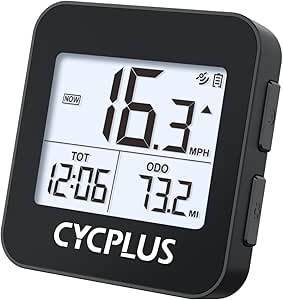 | Best Simple, Long-Runtime GPS Computer | Display: 2-inch FSTN LED | Battery capacity: 1200 mAh lithium polymer | Battery life: Over 55 hours stated | VIEW LATEST PRICE | See Our Full Breakdown |
| Wahoo ELEMNT ROAM V3 GPS Bike Computer with Navigation and Touchscreen |  | Best for Navigation and Route Flexibility | Display: 2.8-inch LCD color touchscreen, 480 × 800 resolution | Battery life: Up to 25 hours | GPS support: Dual-band GPS; GPS, GLONASS, BeiDou, Galileo, QZSS, SBAS, NavIC | VIEW LATEST PRICE | See Our Full Breakdown |
| iGPSPORT BSC500 GPS Bike Computer with 3.3-Inch Touchscreen and Voice Navigation |  | Best for Voice-Guided Navigation | Screen: 3.3-inch color touchscreen with physical button controls | Data display: Up to 12 cycling data fields per page | Satellite positioning: Dual-band L1+L5; GPS, GLONASS, BeiDou, Galileo, and QZSS | VIEW LATEST PRICE | See Our Full Breakdown |
| iGPSPORT BiNavi Air GPS Bike Computer with 3.0″ Touchscreen and Map Navigation |  | Best Lightweight Long-Distance Pick | Weight: 77 g | Screen size: 3.0 inches | Thickness: 13.8 mm | VIEW LATEST PRICE | See Our Full Breakdown |
| Magene C506 GPS Bike Computer with 2.4-Inch Color Touchscreen |  | Best for Indoor-and-Outdoor Training | Screen: 2.4-inch color LCD touchscreen with three buttons | Weight: 76 g | Battery life: Up to 24 hours in endurance mode | VIEW LATEST PRICE | See Our Full Breakdown |
| Wahoo ELEMNT BOLT V3 Aero GPS Bike Computer with Navigation |  | Best Button-Controlled Navigation | Display: 2.3-inch color LCD | Battery life: Up to 20 hours | Memory: 16 GB | VIEW LATEST PRICE | See Our Full Breakdown |
| iGPSPORT BSC300T GPS Bike Computer with Touchscreen and Offline Maps |  | Best Value Feature Mix | Screen: 2.4 inches | Dimensions: 82 × 53 × 14.1 mm | Weight: 67 g | VIEW LATEST PRICE | See Our Full Breakdown |
| GEOID CC700 Pro GPS Bike Computer with 2.8-Inch Color Touchscreen |  | Best for App-Connected Route Flexibility | Display: 2.8-inch TFT color touchscreen | Navigation: Offline maps, turn prompts, and app-connected route recalculation | Storage: 4 GB | VIEW LATEST PRICE | See Our Full Breakdown |
| Bikevee GPS Bike Computer with 2.4-Inch Display |  | Best for Straightforward Ride Tracking | Display: 2.4-inch LCD | Battery capacity: 650mAh | Battery runtime: Up to 28 hours | VIEW LATEST PRICE | See Our Full Breakdown |
| iGPSPORT BSC200 Pro GPS Bike Computer with 3-Inch Color Touchscreen and Route Navigation |  | Best for a Large, Clear Navigation Screen | Screen: 3-inch color touchscreen | Navigation: Turn-by-turn and voice guidance with off-course alerts | Connectivity: Bluetooth only | VIEW LATEST PRICE | See Our Full Breakdown |
| COOSPO CS600 GPS Bike Computer with Color Touchscreen |  | Best for Long-Distance Battery Endurance | Display: 2.4-inch color LCD touchscreen | Battery life: Up to 36 hours | Connectivity: Bluetooth and ANT+ | VIEW LATEST PRICE | See Our Full Breakdown |
| Garmin Edge 840 GPS Cycling Computer |  | Best for Advanced Training and Navigation | Display: 2.6-inch capacitive LCD touchscreen, 240 × 320 resolution | Controls: Buttons and touchscreen | Navigation: GPS with multi-band GNSS; North America map coverage | VIEW LATEST PRICE | See Our Full Breakdown |
| GPS bike computer | Connectivity | Battery life | Weight | Navigation |
|---|---|---|---|---|
| Garmin Edge 1050 Premium Cycli | Bluetooth, USB, Wi-Fi | Up to 20 hours demanding use; up to 60 hours in battery saver mode | 5.7 ounces | — |
| Garmin Edge 850 Compact GPS Cy | Bluetooth, USB, Wi-Fi | Up to 12 hours; up to 36 hours in battery saver mode | 3.9 ounces | — |
| Garmin Edge 540 GPS Cycling Co | Bluetooth, Wi-Fi, USB | Up to 26 hours; up to 42 hours in battery saver mode | 2.8 ounces | GPS; multi-band GNSS |
| CYCPLUS G1 Wireless GPS Bike C | Wireless GPS | Over 55 hours stated | 70 g | — |
| Wahoo ELEMNT ROAM V3 GPS Bike | Bluetooth, USB, Wi-Fi | Up to 25 hours | 109 g | Turn-by-turn directions, route sharing, route generation, and 64 GB offline maps |
| iGPSPORT BSC500 GPS Bike Compu | ANT+ and Bluetooth | Up to 25 hours | — | Turn-by-turn directions, voice alerts, and automatic off-course rerouting |
| iGPSPORT BiNavi Air GPS Bike C | ANT+ and Bluetooth | More than 30 hours | 77 g | — |
| Magene C506 GPS Bike Computer | ANT+, Bluetooth, and Wi-Fi | Up to 24 hours in endurance mode | 76 g | GPS with downloadable maps and turn-by-turn directions |
| Wahoo ELEMNT BOLT V3 Aero GPS | Bluetooth, ANT+, Wi-Fi, and USB-C | Up to 20 hours | 84 g | Turn-by-turn directions, route generation, and rerouting |
| iGPSPORT BSC300T GPS Bike Comp | ANT+, Bluetooth 5.0, and USB Type-C | Up to 20 hours | 67 g | Offline maps, route preview, turn prompts, and off-course warning |
| GEOID CC700 Pro GPS Bike Compu | ANT+, Bluetooth, and Wi-Fi | — | 0.22 kg | Offline maps, turn prompts, and app-connected route recalculation |
| Bikevee GPS Bike Computer with | — | — | 50 g | — |
| iGPSPORT BSC200 Pro GPS Bike C | Bluetooth only | Up to 25 hours | 0.1 kg | Turn-by-turn and voice guidance with off-course alerts |
| COOSPO CS600 GPS Bike Computer | Bluetooth and ANT+ | Up to 36 hours | 120 g | Route navigation with breadcrumb trail support |
| Garmin Edge 840 GPS Cycling Co | Bluetooth, Wi-Fi, and USB | Up to 26 hours in demanding use; up to 32 hours in battery-saver mode | — | GPS with multi-band GNSS; North America map coverage |
More Details on Our Top Picks
Garmin Edge 1050 Premium Cycling Computer
The Garmin Edge 1050 suits riders who want navigation and ride data to be easy to read and manage from the handlebar. Its 3.5-inch color touchscreen gives route planning, road-surface details, and climbing information more room than the smaller displays on the Edge 850 and Edge 540. I’d favor it for long, involved rides where on-device course creation and connected group-ride tools matter more than a light setup.
The tradeoff is size and battery endurance: demanding-use life is up to 20 hours, below the Edge 540’s 26 hours and Wahoo ELEMNT ROAM V3’s 25 hours. Smartphone-dependent functions and optional sensors also add setup requirements. The built-in speaker handles prompts and a bike bell, but buyers who mainly want dependable GPS tracking may find the less feature-heavy CYCPLUS G1 a simpler fit.
Pros:- Large touchscreen makes maps and ride data easier to view at a glance.
- Course creation is available directly on the device.
- Maps include road-surface and climbing information.
- Speaker supports navigation prompts and a bike bell.
Cons:- Demanding-use battery life is shorter than the Edge 540 and Wahoo ELEMNT ROAM V3.
- Some connected functions require a compatible smartphone and Garmin Connect app.
- Personalized training features depend on compatible power and heart-rate sensors.
Best for: Riders who want a large navigation screen, on-device route planning, and connected group-ride features for feature-rich training and touring.
Not ideal for: Riders prioritizing low weight, longer demanding-use battery life, or basic ride tracking without a smartphone and optional sensors.
- Display:3.5-inch capacitive LCD touchscreen
- Battery life:Up to 20 hours demanding use; up to 60 hours in battery saver mode
- Storage:64 GB
- Satellite systems:GPS, GLONASS, Galileo
- Connectivity:Bluetooth, USB, Wi-Fi
- Audio output:Built-in speaker
- Weight:5.7 ounces
- Mounting:Handlebar mount
Our verdict“Choose the Edge 1050 if a large, capable navigation display matters more to you than lower weight or longer demanding-use battery life.”
Garmin Edge 850 Compact GPS Cycling Computer
The Garmin Edge 850 packs maps and performance tools into a smaller unit than the Edge 1050, making it a better match for riders who want a compact cockpit without giving up touchscreen navigation. Its touchscreen and physical buttons offer two ways to operate the computer, while preloaded road, gravel, and trail maps broaden its usefulness beyond paved routes. Multi-band GPS and smart fueling alerts add value for riders who track training as well as direction.
Its main compromise is endurance: up to 12 hours in demanding use is markedly less than the Edge 540’s 26 hours or the Wahoo ELEMNT ROAM V3’s 25. That makes it less reassuring for long days without a charging plan. Connected functions also depend on a compatible phone and Garmin Connect. I’d choose it over the larger Edge 1050 for a compact, feature-rich setup, but not for maximum screen size or battery runtime.
Pros:- Compact color touchscreen pairs with physical buttons.
- Preloaded maps cover road, gravel, and trail riding.
- Multi-band GPS supports detailed position tracking.
- Includes smart fueling alerts and a built-in speaker.
Cons:- Up to 12 hours of demanding-use battery life trails the Edge 540 and ROAM V3.
- Some connected features require a compatible smartphone and Garmin Connect.
- Smaller screen gives maps less room than the Edge 1050.
Best for: Road, gravel, and trail riders who want premium mapping and dual control types in a compact handlebar computer.
Not ideal for: Riders doing long unsupported days who need extended demanding-use battery life, or anyone who prefers a larger map display.
- Screen:2.7-inch LCD color touchscreen
- Controls:Touchscreen and buttons
- Battery life:Up to 12 hours; up to 36 hours in battery saver mode
- Satellite systems:GPS, GLONASS, Galileo
- Connectivity:Bluetooth, USB, Wi-Fi
- Dimensions:0.7 × 2.1 × 3.6 inches
- Weight:3.9 ounces
- Mounting:Handlebar mount
Our verdict“Pick the Edge 850 for broad mapping and flexible controls in a compact unit, provided its shorter battery runtime fits your rides.”
Garmin Edge 540 GPS Cycling Computer
The Garmin Edge 540 is the practical choice for riders who value reliable physical controls and longer demanding-use battery life over a touchscreen. Its buttons are easier to operate in conditions where tapping a display is awkward, while multi-band GNSS and ride-specific maps support route following. ClimbPro can show remaining ascent and grade even on rides without a course, giving the Edge 540 a useful training focus compared with the more navigation-forward CYCPLUS G1.
At up to 26 hours in demanding use, it outlasts both the Edge 1050 and Edge 850 under the listed conditions. The tradeoff is a smaller, button-only screen, so map interaction is less direct than on the Edge 1050 or Wahoo ELEMNT ROAM V3. Some adaptive coaching and performance insights also require compatible power and heart-rate sensors. I’d choose it for training and endurance, not for touchscreen-first route planning.
Pros:- Up to 26 hours of demanding-use battery life.
- Button controls suit operation when touchscreen use is inconvenient.
- Multi-band GNSS supports enhanced positioning accuracy.
- ClimbPro can display ascent and grade without a preloaded course.
Cons:- Button-only input makes map interaction less direct than on the Edge 1050 or ROAM V3.
- Several coaching and performance features require compatible power and heart-rate sensors.
- North America map coverage may not suit riders seeking other regions.
Best for: Training-focused cyclists who prefer button controls, want climb information, and need more demanding-use battery life than the Edge 1050 or Edge 850 offers.
Not ideal for: Riders who want touchscreen route planning, a large map display, or sensor-free access to every training insight.
- Screen:2.6-inch LCD, 246 × 322 resolution
- Input:Buttons
- Battery life:Up to 26 hours; up to 42 hours in battery saver mode
- Storage:16 GB
- Navigation:GPS; multi-band GNSS
- Map coverage:North America
- Connectivity:Bluetooth, Wi-Fi, USB
- Weight:2.8 ounces
Our verdict“Choose the Edge 540 if physical controls, climb-focused training, and extended demanding-use runtime matter more than touchscreen convenience.”
CYCPLUS G1 Wireless GPS Bike Computer
The CYCPLUS G1 is for riders who want GPS-based ride records without the mapping and training complexity of the Garmin Edge models. It tracks essentials such as distance, ride time, mileage, and altitude, while its sunlight-visible 2-inch screen and automatic backlight keep basic figures readable as light changes. Its stated runtime of over 55 hours also makes it a clear endurance pick beside the Garmin Edge 850, whose demanding-use battery life is up to 12 hours.
That simplicity is also the limit: this is not a close substitute for the Edge 1050 or Wahoo ELEMNT ROAM V3 if you need route guidance, detailed maps, or connected training tools. The small display restricts how much information fits at once, and the unit sleeps after 10 minutes of inactivity. I’d shortlist it for straightforward tracking and wet-weather rides, not for riders who need turn-by-turn navigation.
Pros:- Tracks core ride information, including distance, time, mileage, and altitude.
- Over 55 hours of stated operating time.
- Sunlight-visible display includes automatic backlighting.
- IPX6-rated body is suited to wet-weather rides.
Cons:- Two-inch screen limits the amount of data visible at once.
- Does not offer the detailed mapping and navigation features of the Edge 1050 or ROAM V3.
- Enters sleep mode after 10 minutes of inactivity.
Best for: Casual and utility cyclists who want long-running GPS tracking of core ride data and a display suited to outdoor use.
Not ideal for: Route-focused riders who need maps, turn-by-turn directions, or the training and connected features found on the Garmin Edge 540 or Edge 1050.
- Display:2-inch FSTN LED
- Battery capacity:1200 mAh lithium polymer
- Battery life:Over 55 hours stated
- Connectivity:Wireless GPS
- Water resistance:IPX6
- Controls:Buttons
- Weight:70 g
- Mounting:Handlebar mount
Our verdict“Choose the CYCPLUS G1 for basic GPS ride records and extended runtime, but look to the Garmin Edge 540 or ROAM V3 for navigation.”
Wahoo ELEMNT ROAM V3 GPS Bike Computer with Navigation and Touchscreen
The Wahoo ELEMNT ROAM V3 balances a color touchscreen with physical buttons, making it a flexible option for riders who want to follow, share, or generate routes without relying on a button-only interface. Its dual-band GPS and offline maps are well suited to rides through dense urban streets or wooded areas, while route imports and turn-by-turn guidance give it a stronger navigation emphasis than the simpler CYCPLUS G1. At 25 hours of stated battery life, it also offers more demanding-use headroom than the Edge 850’s 12-hour figure.
The Edge 1050 counters with a larger 3.5-inch screen and more extensive listed training and group-ride tools; the ROAM V3’s 2.8-inch display is a more compact compromise. Its maximum runtime still may not cover every long outing, and route generation depends on compatible files or the companion app. I’d pick it for navigation flexibility, while riders seeking a big screen should compare it with the Edge 1050.
Pros:- Dual-band GPS supports tracking in forests and dense urban areas.
- Turn-by-turn navigation works with route sharing and route generation.
- Offline maps support riding without continuous connectivity.
- Touchscreen and buttons provide alternative control methods.
Cons:- Up to 25 hours of battery life may not cover the longest rides without recharging.
- Route generation depends on compatible route files or the companion app.
- The 2.8-inch display is smaller than the Edge 1050’s 3.5-inch screen.
Best for: Riders who regularly import, share, or generate routes and want offline mapping, dual-band GPS, and both touchscreen and button controls.
Not ideal for: Cyclists who prioritize the largest screen, extensive training features, or battery runtime beyond its stated 25-hour maximum.
- Display:2.8-inch LCD color touchscreen, 480 × 800 resolution
- Battery life:Up to 25 hours
- GPS support:Dual-band GPS; GPS, GLONASS, BeiDou, Galileo, QZSS, SBAS, NavIC
- Navigation:Turn-by-turn directions, route sharing, route generation, and 64 GB offline maps
- Connectivity:Bluetooth, USB, Wi-Fi
- Water resistance:IPX7
- Weight:109 g
- Mounting:Handlebar mount; integrated out-front and stem mounts included
Our verdict“Choose the ROAM V3 if route handling and offline navigation are your priorities, and the Edge 1050’s larger display is not worth the added size to you.”
iGPSPORT BSC500 GPS Bike Computer with 3.3-Inch Touchscreen and Voice Navigation
The BSC500 is a strong fit for riders who want route guidance without keeping their eyes fixed on a small map. Its 3.3-inch touchscreen, turn-by-turn voice alerts, and automatic rerouting make missed turns easier to manage than on the button-only Wahoo ELEMNT BOLT V3. Physical controls alongside touch give you another way to operate it, while dual-band positioning across five satellite systems supports reliable tracking. Climb previews, group location sharing, and compatibility with common sensors add range for training and social rides. The tradeoff is that several capabilities rely on compatible sensors, apps, or route services, and the listed data does not specify storage capacity or display resolution. Choose the BiNavi Air instead if lower weight and offline-map support matter more than a larger screen and voice prompts.
Pros:- Large 3.3-inch color touchscreen is paired with physical controls.
- Voice navigation and automatic rerouting help riders recover from missed turns.
- Dual-band positioning supports five satellite systems.
- Up to 25 hours of battery life and IPX7 water resistance suit extended rides in wet weather.
Cons:- Some features depend on compatible sensors, apps, or route services.
- Storage capacity and screen resolution are not specified in the provided product data.
Best for: Riders who want a large touchscreen, spoken turn cues, and automatic rerouting for unfamiliar routes.
Not ideal for: Minimalist riders who prioritize a slim, lightweight unit or need confirmed storage capacity and screen-resolution details before buying.
- Screen:3.3-inch color touchscreen with physical button controls
- Data display:Up to 12 cycling data fields per page
- Satellite positioning:Dual-band L1+L5; GPS, GLONASS, BeiDou, Galileo, and QZSS
- Navigation:Turn-by-turn directions, voice alerts, and automatic off-course rerouting
- Connectivity:ANT+ and Bluetooth
- Battery life:Up to 25 hours
- Water resistance:IPX7
- Additional features:Group Ride location sharing, iClimb 2.0, built-in speaker, and electronic bike bell
Our verdict“Choose the BSC500 if you value spoken route guidance and a roomy screen more than a compact design or fully specified storage.”
iGPSPORT BiNavi Air GPS Bike Computer with 3.0″ Touchscreen and Map Navigation
At 77 g, the BiNavi Air is the lightest-feeling choice in this group by listed weight, making it a sensible match for riders who want substantial navigation without a bulky cockpit unit. It combines dual-band GPS with five satellite systems, offline maps, turn-by-turn directions, and automatic rerouting. Its 30+ hours of battery life also outlasts the BSC500’s listed 25 hours, which gives it an advantage for long rides where charging access is limited. The BSC500 counters with a larger 3.3-inch screen and voice alerts; the BiNavi Air has a 3.0-inch display and the supplied data does not list voice navigation. Touch controls may be awkward with gloves or in heavy rain, and route planning and analysis rely on the companion app.
Pros:- Low 77 g weight and slim 13.8 mm profile.
- Dual-band GPS supports five satellite systems.
- Offline maps, turn-by-turn guidance, POI search, and automatic rerouting support route finding.
- More than 30 hours of listed battery life.
Cons:- Touchscreen controls may be less practical with gloves or in heavy rain.
- Route planning and analysis require the companion app.
- Its 3.0-inch screen is smaller than the BSC500’s 3.3-inch display.
Best for: Endurance and touring riders who want offline maps, long battery life, and a light computer for extended rides.
Not ideal for: Riders who rely on physical controls in wet weather or want route planning and analysis to work independently of a companion app.
- Weight:77 g
- Screen size:3.0 inches
- Thickness:13.8 mm
- Battery life:More than 30 hours
- Battery capacity:1,020 mAh
- GPS technology:Dual-band L1+L5
- Supported satellites:GPS, GLONASS, BeiDou, Galileo, and QZSS
- Connectivity:ANT+ and Bluetooth
- Charging time:Approximately 1.5 hours
Our verdict“Pick the BiNavi Air for long rides where low weight, offline navigation, and extended battery life matter most.”
Magene C506 GPS Bike Computer with 2.4-Inch Color Touchscreen
The C506 stands apart by linking outdoor navigation with smart-trainer controls. It supports FIT-file workouts, power targets, resistance, and gradient settings, so riders can carry a structured training routine indoors as well as record GPS rides outside. ANT+, Bluetooth, and Wi-Fi also give it broad connection options, while its 76 g weight keeps the unit light. Compared with the iGPSPORT BSC300T, the C506 adds Wi-Fi and the listed smart-trainer workout controls, but the BSC300T provides offline maps and explicitly lists five satellite systems. The C506’s 2.4-inch screen is compact, and its endurance-mode battery life is up to 24 hours. The product data does not specify waterproofing, so riders who often face rain may prefer a model with a stated water-resistance rating.
Pros:- Supports indoor workouts with FIT files, power targets, resistance, and gradient settings.
- ANT+, Bluetooth, and Wi-Fi connectivity.
- Compatible with a broad range of sensors, smart trainers, radar, and electronic shifting systems.
- Light 76 g design with touchscreen and three physical buttons.
Cons:- Waterproofing details are not specified in the provided product data.
- Indoor training setup and ride analysis rely on the OnelapFit app.
- The 2.4-inch screen is smaller than the BSC500 and BiNavi Air displays.
Best for: Cyclists who alternate between GPS rides and structured indoor sessions with a compatible smart trainer.
Not ideal for: All-weather riders who need a stated water-resistance rating or cyclists who want offline maps confirmed in the product specifications.
- Screen:2.4-inch color LCD touchscreen with three buttons
- Weight:76 g
- Battery life:Up to 24 hours in endurance mode
- Connectivity:ANT+, Bluetooth, and Wi-Fi
- Navigation:GPS with downloadable maps and turn-by-turn directions
- Mounting:Handlebar mount
- Compatible devices:Speed and cadence sensors, heart-rate monitors, power meters, smart trainers, radar and smart tail lights, and electronic shifting systems
- Training features:FIT-file workouts with power targets, resistance, and gradient settings
- App:OnelapFit
Our verdict“Choose the C506 if smart-trainer workouts are as important to you as recording and navigating outdoor rides.”
Wahoo ELEMNT BOLT V3 Aero GPS Bike Computer with Navigation
The BOLT V3 is the straightforward pick for riders who prefer physical buttons to touchscreen operation. Its 2.3-inch color display is smaller than the touchscreens on the iGPSPORT BSC500 and BiNavi Air, but on-device turn-by-turn directions, route generation, and automatic rerouting keep the core navigation tools close at hand. 16 GB of memory provides space for stored maps and routes, while IPX7 water resistance adds reassurance for wet rides. Connectivity covers Bluetooth, ANT+, and Wi-Fi, though smartphone-linked features such as smart notifications and LiveTrack require a connected phone. Its listed 20-hour battery life is shorter than the BSC500’s 25 hours and the BiNavi Air’s 30-plus hours, making it less compelling for riders prioritizing maximum runtime.
Pros:- Physical buttons operate navigation without relying on a touchscreen.
- On-device route generation, turn-by-turn directions, and rerouting.
- 16 GB of memory for maps and routes.
- IPX7 water resistance and Bluetooth, ANT+, and Wi-Fi connectivity.
Cons:- Listed battery life of up to 20 hours is shorter than the BSC500 and BiNavi Air.
- The 2.3-inch display is smaller than the touchscreens on several alternatives.
- Smart notifications and LiveTrack require a connected smartphone; some route and workout features need third-party accounts.
Best for: Riders who want button-operated route guidance, stored maps, and weather-resistant hardware in a compact computer.
Not ideal for: Riders seeking a large touchscreen or the longest battery life for very long rides.
- Display:2.3-inch color LCD
- Battery life:Up to 20 hours
- Memory:16 GB
- Connectivity:Bluetooth, ANT+, Wi-Fi, and USB-C
- Navigation:Turn-by-turn directions, route generation, and rerouting
- Sensors:Heart rate, cadence, and speed
- Weight:84 g
- Water resistance:IPX7
- Controls:Buttons
Our verdict“Pick the BOLT V3 if you prefer dependable button controls and onboard route storage over a larger touchscreen or longer runtime.”
iGPSPORT BSC300T GPS Bike Computer with Touchscreen and Offline Maps
The BSC300T brings a useful spread of navigation and training connections into a compact 67 g unit. Offline maps, turn prompts, route previews, and off-course warnings give it more route support than the Magene C506’s listed navigation details, while its touchscreen and six physical buttons offer more control options than the touch-led BiNavi Air. It also supports five satellite systems, real-time tracking, and more than 130 riding metrics. The tradeoff is a 20-hour battery life, shorter than the C506’s 24 hours and the BiNavi Air’s 30-plus. The charging cable is not included, and power meters require ANT+, so buyers should check their existing equipment and connection needs before choosing it.
Pros:- Touchscreen plus six physical buttons offers flexible operation.
- Offline maps, turn prompts, route previews, and off-course warnings.
- Supports five satellite systems and real-time group tracking.
- Light 67 g body with ANT+ and Bluetooth 5.0 connectivity.
Cons:- Charging cable is not included.
- Power meters require ANT+; device compatibility varies by protocol.
- Up to 20 hours of battery life is shorter than the C506 and BiNavi Air listings.
Best for: Riders wanting offline maps, multiple control options, and broad sensor support in a small, light GPS computer.
Not ideal for: Cyclists who expect a charging cable in the box, need power-meter support over Bluetooth, or regularly ride beyond a 20-hour charge.
- Screen:2.4 inches
- Dimensions:82 × 53 × 14.1 mm
- Weight:67 g
- Battery life:Up to 20 hours
- Memory:8 GB
- Connectivity:ANT+, Bluetooth 5.0, and USB Type-C
- Navigation:Offline maps, route preview, turn prompts, and off-course warning
- Satellite systems:GPS, BeiDou, GLONASS, Galileo, and QZSS
- Compatible devices:Speed, cadence, and heart-rate sensors; ANT+ power meters; smartwatches; smart trainers; and e-bikes
Our verdict“Choose the BSC300T if you want offline navigation and both touch and button controls in a lightweight unit, and its charging and sensor limits suit your setup.”
GEOID CC700 Pro GPS Bike Computer with 2.8-Inch Color Touchscreen
The GEOID CC700 Pro offers a useful middle ground between basic ride tracking and more elaborate navigation: its offline maps and turn prompts help you follow a planned route, while route recalculation depends on its companion app being connected. That makes it more navigation-focused than the Bikevee, which concentrates on ride and elevation data without listed mapping features. The CC700 Pro also supports ANT+, Bluetooth, and Wi-Fi, plus indoor smart-trainer workouts and FIT exports, giving it broader training-device flexibility than the Bluetooth-only iGPSPORT BSC200 Pro. Its touchscreen is backed by three physical buttons, a practical alternative when touch controls are awkward. The tradeoffs are app dependence for recalculation, AGNSS data that needs syncing every 14 days for the stated quick positioning, and camera control limited to two DJI models.
Pros:- Offline maps and turn prompts support route following away from a live connection.
- ANT+, Bluetooth, and Wi-Fi offer broad sensor and syncing options.
- Supports smart-trainer workouts and FIT file exports.
- Touchscreen and three physical buttons provide two ways to operate the unit.
Cons:- Route recalculation requires a connection to the designated app.
- AGNSS data must be synced every 14 days for the stated quick positioning.
- Camera control is limited to DJI Action 4 and Action 5 Pro.
Best for: Riders who want offline route guidance, multi-protocol sensor support, and a computer that can also connect to indoor training platforms.
Not ideal for: Riders who need route recalculation without a phone connection or who want camera controls for brands beyond the specified DJI Action models.
- Display:2.8-inch TFT color touchscreen
- Navigation:Offline maps, turn prompts, and app-connected route recalculation
- Storage:4 GB
- Satellite systems:GPS, BeiDou, GLONASS, QZSS, and Galileo
- Connectivity:ANT+, Bluetooth, and Wi-Fi
- Water resistance:IPX7
- Weight:0.22 kg
Our verdict“Choose the CC700 Pro if you want offline mapping and wide training connectivity, and can accept app-dependent recalculation.”
Bikevee GPS Bike Computer with 2.4-Inch Display
The Bikevee GPS Bike Computer is the simplest choice here for riders who want core ride and elevation numbers without making route mapping the priority. It tracks speed, distance, ride time, temperature, altitude, gradient, and accumulated ascent; its built-in GPS means you do not need a wheel sensor or spoke magnet to get started. Compared with the GEOID CC700 Pro or COOSPO CS600, it gives up listed route-navigation features and color touchscreens, but its 650mAh battery lasts up to 28 hours and the automatic backlight reduces button work in changing light. Auto start and stop also keep routine rides simple. One quirk is its seven-minute inactivity sleep mode, and button-only controls may feel less direct than a touchscreen when changing screens on the move.
Pros:- Built-in GPS tracks rides without a wheel sensor or spoke magnet.
- Records a broad set of ride and elevation data.
- Up to 28 hours of runtime with IPX7 water resistance.
- Automatic backlight and auto start/stop reduce manual operation.
Cons:- The listed feature set does not include route maps or turn-by-turn navigation.
- Button-only controls are less direct than the touchscreens on the GEOID CC700 Pro and COOSPO CS600.
- Enters sleep mode after seven minutes of inactivity.
Best for: Riders who want GPS-based ride and elevation data, long runtime, and minimal setup rather than on-device route guidance.
Not ideal for: Cyclists who need maps or turn-by-turn navigation, or who prefer touchscreen controls and a fuller sensor-connection ecosystem.
- Display:2.4-inch LCD
- Battery capacity:650mAh
- Battery runtime:Up to 28 hours
- Sensors:GPS, motion sensor, barometric altimeter, and speed sensor
- Water resistance:IPX7
- Controls:Buttons
- Weight:50 g
- Charging:USB-C
Our verdict“Pick the Bikevee for dependable ride and elevation tracking with long runtime, but skip it if you need mapped navigation.”
iGPSPORT BSC200 Pro GPS Bike Computer with 3-Inch Color Touchscreen and Route Navigation
The iGPSPORT BSC200 Pro puts screen space and route guidance ahead of connection breadth. Its 3-inch color touchscreen, turn-by-turn and voice navigation, and off-course alerts give riders a clear way to follow a route and notice when they stray. It also offers more than 100 cycling metrics, ride resumption after an interruption, and up to 25 hours of battery life. That is a more navigation-led package than the Bikevee, which focuses on ride data, while the GEOID CC700 Pro has the broader ANT+, Bluetooth, and Wi-Fi support. The BSC200 Pro is Bluetooth-only and does not support ANT+, so riders with existing ANT+ sensors should look elsewhere. Connected features also depend on compatible devices, making this a better fit for riders whose equipment already matches its ecosystem.
Pros:- Large 3-inch color touchscreen with customizable route colors.
- Turn-by-turn and voice navigation with off-course alerts.
- Up to 25 hours of battery life.
- Can resume an interrupted ride and track more than 100 cycling metrics.
Cons:- Bluetooth-only connectivity; ANT+ devices are not supported.
- Connected functions require compatible sensors or devices.
- A large touchscreen-led design may not suit riders who prefer physical-button operation.
Best for: Riders who value a large color screen, voice and turn-by-turn route guidance, and interruption recovery over ANT+ support.
Not ideal for: Cyclists with ANT+-only sensors or those seeking broad device connectivity; the GEOID CC700 Pro supports both ANT+ and Bluetooth.
- Screen:3-inch color touchscreen
- Navigation:Turn-by-turn and voice guidance with off-course alerts
- Connectivity:Bluetooth only
- ANT+ support:No
- Battery life:Up to 25 hours
- Cycling data metrics:More than 100
- Weight:0.1 kg
Our verdict“Choose the BSC200 Pro for its roomy screen and guided navigation if your sensors connect over Bluetooth rather than ANT+.”
COOSPO CS600 GPS Bike Computer with Color Touchscreen
With up to 36 hours of battery life, the COOSPO CS600 is the endurance pick in this group. Its 2.4-inch color touchscreen, auto-backlight, GPS and GLONASS tracking, and route navigation cover the essentials for long days on the bike. The runtime exceeds the stated figures for the Garmin Edge 840 and iGPSPORT BSC200 Pro, making the CS600 a stronger match for riders who prioritize fewer charging stops over advanced training guidance. It also pairs through Bluetooth and ANT+, unlike the Bluetooth-only BSC200 Pro. The main compromise is that extra sensors and extension mounts are sold separately, so expanding the setup takes additional purchases. Its navigation is described as route and breadcrumb support, while the Garmin adds features such as ClimbPro and adaptive training prompts.
Pros:- Up to 36 hours of battery life suits long rides and multi-day use.
- Color touchscreen with auto-backlight.
- Route navigation includes breadcrumb trail support.
- Bluetooth and ANT+ support connection to compatible cycling devices.
Cons:- Additional sensors and extension mounts are sold separately.
- GPS and GLONASS are the listed satellite systems, fewer than the five supported by the GEOID CC700 Pro.
- The feature set is less training-focused than the Garmin Edge 840.
Best for: Touring and endurance riders who want a color screen, route guidance, ANT+ support, and extended runtime between charges.
Not ideal for: Riders seeking bundled extra sensors or advanced training guidance; the Garmin Edge 840 offers more listed coaching and climbing features.
- Display:2.4-inch color LCD touchscreen
- Battery life:Up to 36 hours
- Connectivity:Bluetooth and ANT+
- Satellite systems:GPS and GLONASS
- Navigation:Route navigation with breadcrumb trail support
- Water resistance:IPX7
- Weight:120 g
- Charging:USB Type-C
Our verdict“Choose the CS600 if long runtime matters more than advanced coaching or included add-on sensors.”
Garmin Edge 840 GPS Cycling Computer
The Garmin Edge 840 is the most training-oriented pick in this set, pairing a touchscreen with physical buttons and multi-band GNSS for flexible operation and enhanced positioning. Its 32 GB storage and North America map coverage support a more feature-rich navigation setup than the Bikevee, while ClimbPro, adaptive training prompts, and power guidance give structured riders more than basic route following. Against the COOSPO CS600, the Edge 840 offers deeper listed training tools, but its battery life reaches up to 26 hours in demanding use, or 32 hours in battery-saver mode—short of the CS600’s stated 36 hours. Some coaching and power-guidance features also depend on compatible sensors, including a power meter and heart-rate monitor. This is a stronger fit for a developed training setup than for riders seeking simple tracking.
Pros:- Multi-band GNSS supports enhanced positioning accuracy.
- Touchscreen and physical buttons offer flexible operation.
- ClimbPro, adaptive training prompts, and power guidance add structured-ride tools.
- 32 GB storage and North America map coverage support navigation.
Cons:- Battery life is up to 26 hours in demanding use, below the COOSPO CS600’s stated 36 hours.
- Some training features require compatible sensors, including a power meter and heart-rate monitor.
- The advanced training feature set may be unnecessary for riders seeking only basic ride data.
Best for: Committed cyclists who want multi-band positioning, climb planning, adaptive training features, and both touchscreen and button controls.
Not ideal for: Riders who mainly need basic ride tracking or maximum listed runtime; the Bikevee is simpler, and the COOSPO CS600 has a longer stated battery life.
- Display:2.6-inch capacitive LCD touchscreen, 240 × 320 resolution
- Controls:Buttons and touchscreen
- Navigation:GPS with multi-band GNSS; North America map coverage
- Storage:32 GB
- Connectivity:Bluetooth, Wi-Fi, and USB
- Battery life:Up to 26 hours in demanding use; up to 32 hours in battery-saver mode
- Compatible devices:Android and iPhone
Our verdict“Choose the Edge 840 if you will use its advanced training and navigation tools, and have or plan to add compatible sensors.”
How We Picked
I compared these 15 computers around the tasks that shape day-to-day riding: recording rides, reading data at a glance, following routes, and handling controls without disrupting the ride. I gave more weight to the combination of usable navigation, a practical interface, and feature range than to a single specification such as screen size. Build and mounting practicality, training support, and the difference between touch and button operation also informed the comparison.
The order reflects who is most likely to benefit from each computer, not a claim that every rider needs a flagship. The Edge 840 ranks first for its broad balance; the Edge 1050 and ROAM V3 follow as higher-end choices with distinct strengths. Models with simpler feature sets are positioned for riders who value a more focused computer, while the remaining options are differentiated by their display, navigation approach, and intended use. I avoid treating a long feature list as a win when a rider may not need those tools.
Factors to Consider When Choosing Best GPS Bike Computers
Before choosing a GPS bike computer, match its capabilities to the rides you actually do. A large screen or long feature list can look appealing, but neither helps much if the controls feel awkward or you rarely use turn-by-turn guidance.
Choose Navigation for Your Real Routes
Think about whether you follow planned routes, explore unfamiliar roads, or mostly ride familiar loops. A device that records GPS data is not automatically a good route-following computer; mapping detail, route loading, and on-screen guidance can differ. For touring and long rides in new areas, prioritize readable maps and clear prompts over a list of navigation modes. If you only need to follow a course occasionally, a simpler setup may be enough. A common mistake is buying for the most adventurous ride you might take rather than the rides you do most often. Check how routes are created and transferred before buying, since that process can shape how often you use navigation.
Pick Controls That Fit Your Riding Conditions
Touchscreens make menus and map interaction feel direct, but gloves, rain, and road vibration can make touch input less convenient. Physical buttons offer a more deliberate way to change pages or dismiss prompts while moving, though menus may feel less fluid. Some riders benefit from having both options; others would rather keep operation simple. Think about whether you adjust screens mid-ride or set everything before leaving. Do not assume a touchscreen is automatically easier just because it is familiar from a phone. If you ride in cold weather or frequently encounter wet conditions, control style deserves as much attention as the display.
Match Screen Size to Readability and Bike Setup
A larger screen can make maps and data fields easier to read, but it also takes up more space on the handlebar and may feel bulky on a compact cockpit. Smaller units can keep the setup tidy, yet riders who rely on maps may find the view cramped. Consider your eyesight, preferred data layout, and whether you need to see several metrics at once. Display size alone does not tell you how useful the information will be; page customization and contrast matter too. Avoid choosing a computer solely because it has the biggest screen. Picture the actual view you need while riding, not just the device on a product page.
Separate Training Needs From Ride Recording
Many cyclists want distance, speed, time, and a saved ride; structured training adds a different set of requirements. If you follow planned workouts or review performance data after rides, check whether the computer supports the sensors and training features you intend to use. Riders who mainly want a route record may gain little from a more elaborate training toolkit. Also think about your existing setup: sensor compatibility and the way data syncs with your preferred cycling services can affect convenience. A common overspend is paying for advanced training functions before deciding to use them. Start with the metrics and devices you already rely on, then choose features that address a real gap.
Check Battery Expectations Against Ride Length
Battery needs depend on how long you ride and which functions remain active. Navigation, a bright display, and connected sensors can place different demands on a computer than a basic recording ride. If you regularly ride all day, choose with a margin rather than relying on a best-case battery claim. For short commutes or regular training loops, a smaller endurance cushion may be acceptable. Remember that battery performance can change with settings and use, so compare stated figures carefully and look for the conditions behind them. Before a long event or tour, test your preferred setup and charging plan rather than discovering its limits on the road.
Pay for Features You Will Use, Not Features You Might Use
Flagship computers make sense when their broader navigation, display, or training tools solve problems you face on frequent rides. If you only want basic GPS tracking and a few data fields, a simpler computer can be a more sensible fit. Assess the whole ownership setup too: mounts, sensors, route services, and the effort needed to configure screens all affect value. A low-cost unit is not a bargain if it lacks a feature you rely on, while an advanced model is poor value if its extras stay unused. List your must-haves before comparing model names. This keeps the decision focused on the ride rather than the appeal of a feature checklist.
Frequently Asked Questions
Is the Garmin Edge 840 a better choice than the Edge 1050 for most riders?
I would favor the Edge 840 when a balanced mix of navigation and training features matters more than buying Garmin’s most premium option. The Edge 1050 is better suited to riders who specifically want its higher-end format and feature set. The right choice depends on whether those extra capabilities change how you ride, rather than on the model number alone. Compare the screen and controls with your preferred handlebar setup, too. If the Edge 1050’s particular strengths do not address a clear need, the Edge 840 is the more broadly sensible starting point.
Should I choose a touchscreen or a button-operated GPS bike computer?
Choose based on how you interact with a computer while riding, not on which control style sounds newer. Touch input can make map browsing and menu selection feel straightforward, but wet weather and gloves may make it less convenient. Buttons can be easier to operate by feel and suit riders who want less reliance on the screen. The Edge 540 is a useful button-led option in this group, while several other models emphasize touchscreen operation. If you often change settings mid-ride, try to prioritize predictable control over a long list of interface features.
Do I need offline maps, or is basic GPS ride tracking enough?
Basic GPS tracking is enough if you ride known routes and mainly want a record of distance, speed, and time. Offline maps are more valuable when you ride beyond reliable mobile coverage, tour in unfamiliar places, or want guidance without depending on a phone connection. Route support also involves more than a map appearing on the screen: the process for loading courses and following directions matters. Consider how often you explore and whether you are comfortable setting routes up before a ride. Paying for mapping you rarely use may not improve your everyday experience.
Can a compact or lower-feature computer work for long rides?
It can, provided its battery performance, data display, and route functions match the demands of your rides. Long duration alone does not require a flagship, but extended rides make clear navigation, readable fields, and reliable recording more useful. Check how battery use changes when maps, a bright screen, and connected sensors are active. Also ask whether you need to follow a course or only record where you went. A simpler computer may be a good fit for long familiar routes, while remote touring calls for stronger navigation support.
What should I check before replacing my current bike computer?
Start with what your current computer cannot do: perhaps its screen is hard to read, route guidance is limited, or its controls are inconvenient. Then check whether a new model works with your existing sensors, mounts, and data services. Moving to a more advanced unit may also involve a different setup process for routes and screen pages. If your current device already records rides reliably, a replacement is most worthwhile when it fixes a specific limitation. That approach helps avoid paying for overlapping features that will not change your riding.
Conclusion
For the broadest fit, I recommend the Garmin Edge 840 as best overall, with the Edge 540 as best for riders who prefer physical buttons. The Garmin Edge 1050 is my best premium pick for cyclists who want a higher-end, feature-rich computer, while the CYCPLUS G1 is a value-minded choice for riders whose needs center on straightforward GPS ride data. Beginners should focus on a computer they can set up and read comfortably; a simpler model may serve them better than a flagship packed with unused tools. For route-focused rides, compare the Wahoo ELEMNT ROAM V3 with the navigation-oriented iGPSPORT options and choose by interface and route needs. The best fit is the one whose navigation, controls, and data match the rides you actually do.
NFL season / tailgating Picks

YETI LoadOut GoBox 28 Wheeled Waterproof Hard Gear Case
As an affiliate, we earn on qualifying purchases.