
TL;DR

Get sports gear delivered free with Prime
- Fast, free delivery on millions of items
- Prime Video, Amazon Music and more included
- Member-only deals all year
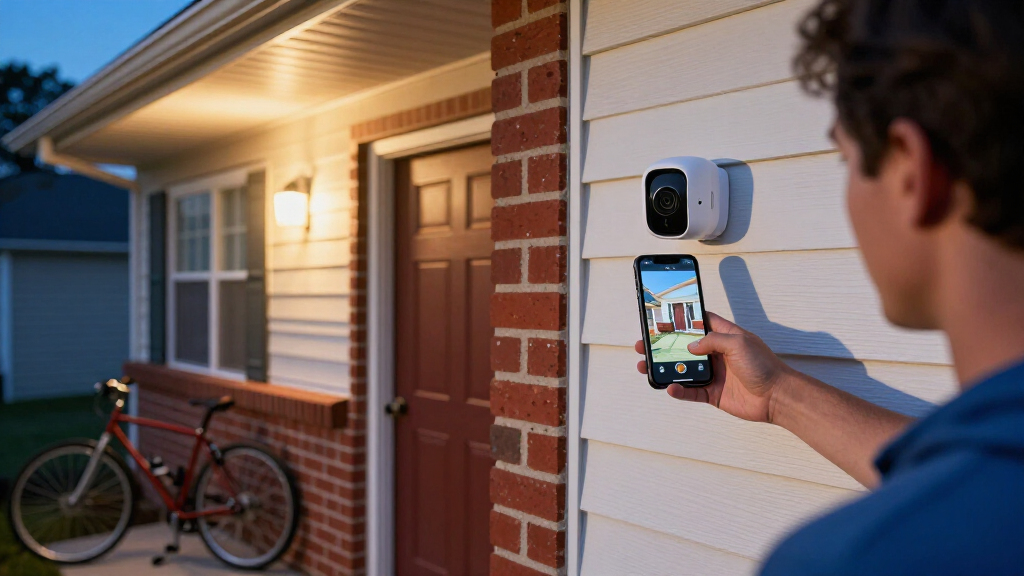
Outdoor security cameras with spotlight pair a motion-activated light with video monitoring, which can help illuminate a person and capture clearer color footage at night. To choose one, compare beam coverage, detection controls, power, Wi-Fi, night vision, and recording costs; a bright light alone cannot guarantee useful footage or prevent an incident.
A motion light snaps on, the dark side path turns bright, and your phone shows who is by the gate. That is the appeal of outdoor security cameras with spotlight: video monitoring and illumination work together, giving you a better chance of seeing what happened after sunset.
If you are shopping around the Ring Spotlight Cam Plus Battery, compare what matters at your mounting spot: light coverage, night video, power, alerts, and recording. This guide explains how those features work, compares several listed alternatives, and helps you avoid surprises with Wi-Fi, subscriptions, and installation.
A spotlight can support color night footage only when enough light reaches the scene; distance, weather, and beam angle affect detail.
Choose battery power for flexible mounting and wired power for a fixed location with a suitable connection; confirm installation and recording behavior.
Compare actual brightness and beam spread, not just the words “spotlight” and “floodlight.”
Tune motion zones, sensitivity, and schedules to reduce alerts from roads, pets, and moving branches.
Check Wi-Fi, storage plans, local recording, privacy controls, and current compatibility before committing.
What a spotlight camera can show you after dark
An outdoor security camera with spotlight combines video monitoring with a motion-activated light that brightens a nearby area when activity triggers it. That extra light can make a person easier to see and help the camera capture clearer color, though results depend on distance, weather, the camera, and where you aim the beam.
Say your front path bends behind a tall hedge. A spotlight aimed toward the turn may reveal a visitor’s jacket color and the package in their hands; a camera relying only on infrared may show the same moment in black and white. If the person is far from the light, color footage may still look dim or grainy.
Spotlight and floodlight are overlapping product labels, not a reliable brightness scale. “Floodlight” often describes a larger, brighter fixture, while “spotlight” may describe a more focused beam. Compare the stated brightness, spread, and adjustability, then think about whether the light covers the gate, driveway, or just a small landing.
Useful footage starts with a clear view. A bright lamp cannot compensate for a lens blocked by leaves, a camera aimed into glare, or a weak Wi-Fi signal.
A wide field of view can show more of a yard, but distant faces and license plates may appear smaller. For a long driveway, a camera closer to the approach may capture more useful detail than one mounted high above the garage.
Match the replacement to the way you power it
The best replacement depends first on where power is available and how often activity occurs. A battery camera can be easier to mount, while a wired floodlight can suit a fixed location with an existing outdoor connection; neither arrangement is universally better.
For example, a renter watching a side gate may value a removable battery and a simple mount. A homeowner replacing an old wired light above the garage may prefer a hardwired model that does not need routine charging. Wired installation can involve electrical work, so follow the manufacturer’s directions and use a qualified professional when the job calls for it.
“Wireless” usually describes the network connection, not the power supply. A Wi-Fi camera may still need a cable, a rechargeable battery, or a compatible solar panel. Battery life changes with cold weather, signal strength, clip frequency, and how often the spotlight switches on.
Motion-triggered systems also differ from continuous recording. A camera that starts recording after it detects movement may miss the first seconds of someone approaching. If seeing the whole approach matters, check whether the model offers pre-roll or continuous recording and what power or plan those features require.
- Choose battery power when flexible placement matters and you can check charging needs.
- Choose wired power when you have a suitable connection and want a fixed light-camera setup.
- Check Wi-Fi at the mounting point before installation; a strong signal indoors does not promise good reception outside.
Compare four camera options by the features you need
Compare the listed cameras by lighting, night vision, power, and recording, because those differences affect daily use more than a model name. Specifications vary, and shoppers should confirm current details with the manufacturer before buying.
| Option | Light and night view | Power and useful details |
|---|---|---|
| Blink Wired Floodlight Camera | 2600-lumen floodlight; color night view | Connects to existing outdoor wiring; 1080p HD live view, two-way audio, customizable dual zones, Alexa |
| Blink Outdoor 4 Floodlight Camera with Sync Module Core | 700-lumen motion-triggered light; infrared night vision | 1080p HD live view, two-way audio, dual-zone enhanced motion detection; power details should be checked for the exact package |
| Ring Floodlight Cam Wired Plus | Two motion-activated LED floodlights; Color Night Vision | Hardwired; Two-Way Talk, Alexa, and up to 180 days of video storage with a Ring Home subscription |
| Ring Spotlight Cam Plus Battery | Two motion-activated LED spotlights; Color Night Vision | Quick Release Battery Pack, wide-angle 1080p HD video, customizable motion zones, Two-Way Talk, Alexa, and up to 180 days of storage with Ring Home subscription |
The Blink Wired Floodlight Camera stands out in this set for its stated 2600-lumen light and wired setup. That may suit a broad driveway, but the brightest option can also create glare or spill light toward a neighbor’s window if you aim it poorly.
The Blink Outdoor 4 Floodlight Camera lists a 700-lumen motion-triggered light and infrared night vision. That pairing may fit someone who values motion alerts and does not require color night video; confirm package power details and storage options before deciding.
The Ring Floodlight Cam Wired Plus is a hardwired alternative with two floodlights, Color Night Vision, and Two-Way Talk. The Ring Spotlight Cam Plus Battery keeps the removable battery format and customizable motion zones, so it may be a closer fit when you want to avoid wiring or already use Ring features.
Storage deserves its own check. The Ring options list up to 180 days of video storage with a Ring Home subscription, but plans and feature access can change. Verify what live view, alerts, clip history, and downloads require today, and look for local storage if avoiding a recurring plan matters to you.
Set detection so your phone alerts you to the right movement
Motion zones and sensitivity controls help reduce alerts from traffic, swaying branches, and pets. They also focus attention on the approach you care about, such as a gate or door, instead of every movement at the edge of the frame.
Imagine your camera covers a driveway beside a busy street. If the street sits inside the detection area, passing headlights may trigger repeated alerts. Tighten the zone to the driveway entrance, lower sensitivity if needed, and test the settings at different times of day.
Detection labels can sound similar while behaving differently. A camera may identify people, vehicles, or packages, but “AI detection” does not mean every model recognizes the same events. Check the feature list for the specific model and whether advanced detection needs a subscription.
Many cameras let you schedule the light or choose whether it turns on with motion. A useful setup might activate the light after dusk near the back door while leaving it off during late-night visits to a shared walkway. That keeps the beam purposeful and lowers the chance of nuisance illumination.
- Frame the target area by aiming at the approach, entrance, or vehicle bay.
- Trim the detection zone so it excludes public roads and moving foliage where possible.
- Test alerts and lighting by walking through the scene after dark and reviewing the recorded clip.
- Adjust sensitivity and schedule if ordinary activity causes too many alerts.
Test from more than one direction. A person walking straight toward the camera may trigger differently from someone crossing the frame, and rain or blowing leaves can change what the sensor sees.
Place the camera for a clear view and considerate lighting
Mount the camera where it can see the approach before the entrance, keep a stable Wi-Fi connection, and avoid aiming directly into reflective surfaces or neighboring windows. The manufacturer’s recommended height and weather guidance matter because an exposed camera faces rain, heat, cold, and wind.
For a side path, a position near the house corner may reveal someone before they reach the back door. If you mount it too high under the eaves, you may capture the top of a hood but miss useful facial detail. If you mount it too low, a passerby or a ball can block the view.
Light angle matters just as much. A beam pointed at a pale wall can bounce glare into the lens, while a steep angle may leave a person’s face in shadow. Aim the light across the path rather than directly at the camera, then review night clips and make small adjustments.
Consider the people next door. A bright light aimed at bedroom windows can disturb neighbors, and a wide camera view can collect more of their property than you need. Use adjustable aiming and schedules, and check local rules before recording shared or public spaces.
Before drilling, stand where the camera will go and check the view with your own eyes. Look for branches that sway across the lens, downspouts that block the beam, and corners where a visitor can approach unseen. Then check Wi-Fi at that exact location rather than assuming the signal reaches the whole yard.
Check storage, outages, and privacy before you commit
Read the storage terms before buying, because live viewing and recorded history can be separate features. Some systems offer basic live views and alerts without a paid plan, while cloud clip history or person detection may require a subscription; local storage varies by model.
Picture an incident on Tuesday and a need to share the clip on Friday. You will want to know how long recordings remain available, whether you can download them, and whether a hub or plan is required. A listed retention period is useful only if it matches the service terms and plan you actually choose.
Power and internet outages create different problems. A powered camera may stop during an outage unless it has backup power, and a Wi-Fi camera generally cannot send remote alerts without internet. Some models may keep recording locally, so check the exact outage behavior rather than assuming every camera handles it the same way.
Review account security, software update practices, and audio recording controls. Two-way talk can help you speak to a delivery driver, but audio may capture conversations beyond your property. Aim the camera narrowly and follow local privacy rules for shared areas.
A visible camera, bright light, voice warning, or siren may discourage some unwanted activity, but none guarantees prevention. Treat the camera as one layer alongside sound locks, good exterior lighting, and a clear view of entrances.
Use this short checklist to choose the right setup
Choose a camera by matching its real operating needs to the location, not by comparing one headline number. A small porch, a long driveway, and a remote shed place different demands on brightness, power, Wi-Fi, and storage.
For instance, a porch with an existing light connection and strong Wi-Fi may suit a wired floodlight. A distant garden gate may call for a battery unit and a quick signal test before mounting. If you need identifiable detail at the far end of a driveway, check camera placement and field of view along with resolution.
- Light: Compare brightness, beam spread, adjustability, and whether motion triggers it.
- Night video: Confirm color night capability and how much light the scene needs; check infrared behavior as a fallback.
- Detection: Look for zones and sensitivity controls that fit your traffic, pets, and landscaping.
- Power: Decide whether wiring, battery charging, or a compatible solar option makes sense at the mounting point.
- Connection: Test Wi-Fi where the camera will sit, especially around detached garages and side yards.
- Recording: Check subscription terms, local storage, retention, and clip export.
- Fit and privacy: Verify weather guidance, platform compatibility, audio controls, and light direction.
Manufacturers update software and feature bundles, so verify current specifications, compatibility, storage terms, and privacy policies before purchase. That quick check can prevent a mismatch, such as buying a battery model when you want continuous recording or expecting a floodlight to cover a broad yard when its beam is narrow.
Frequently Asked Questions
Can an outdoor spotlight camera record color video at night?
Often, if the spotlight gives the scene enough light. Distance, rain, beam direction, and camera performance all affect color and detail; without enough light, the camera may use infrared black-and-white night vision.
Does the light turn on every time the camera detects motion?
Many models let you tie the light to motion, but controls vary. Check for schedules, detection zones, sensitivity settings, and an option to keep the light off while still recording or sending alerts.
Can I use a spotlight camera without a subscription?
Sometimes. Live viewing and basic alerts may work without a plan, while cloud video history or advanced detection may require one. Check for local storage and confirm which features remain available without a subscription.
Is a battery-powered spotlight camera reliable?
It can be convenient, especially where wiring is difficult, but battery life depends on temperature, Wi-Fi strength, motion frequency, and how often the light activates. A busy driveway may need more frequent charging than a quiet porch.
Will a camera keep working during a power or internet outage?
A wired camera may stop during a power cut unless it has backup power, and a Wi-Fi camera generally cannot send remote alerts without internet. Some models may continue recording locally, so verify how the specific camera handles outages.
Conclusion
Start with the spot you need to watch, then match the camera’s power, light coverage, night video, alerts, and storage to that location. A well-aimed camera with a steady connection can turn a dark path into a clear scene; the right setup begins with that small, bright circle of light.
NFL season / tailgating Picks
team gear
As an affiliate, we earn on qualifying purchases.